
A Guide to WhatsApp Business Multiple Users for Sales Teams
If your sales team is juggling customer chats on personal phones, you know the chaos. Missed follow-ups, scattered conversations, and the constant question of "who replied to that lead?" This is the frustrating reality for growing teams trying to make the standard WhatsApp Business app work.
There are two ways to get multiple users on WhatsApp Business. You can link up to four extra devices to the free app, which works for very small teams. Or, you can use the WhatsApp Business API through a platform built for it, unlocking unlimited users and serious sales features. For any sales team looking to scale, the API is the only real path forward.
Why a Shared Inbox Is Critical for WhatsApp Sales Teams
Let's paint a picture. An e-commerce team is fielding dozens of inquiries. A potential customer asks about bulk pricing. One rep gives them a quote. An hour later, another rep, completely unaware of that chat, follows up with a generic welcome message. Now the customer is confused, the experience is clunky, and that sale is hanging by a thread.
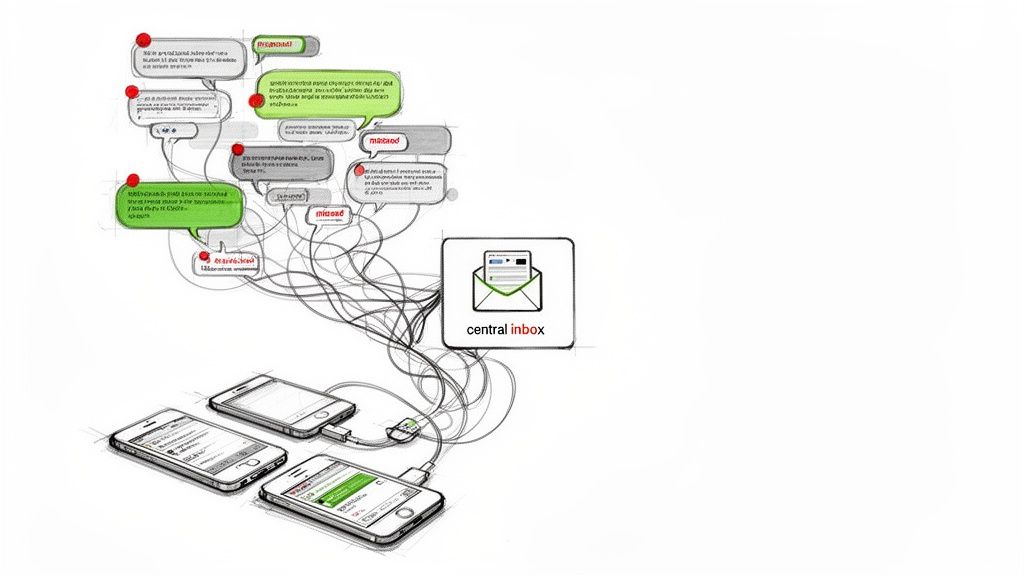
This isn't just an annoyance; it's how revenue gets lost. The free app simply wasn't built for team collaboration, and it creates some painful bottlenecks as you grow.
The Breaking Point for Sales Teams
The core issue is a total lack of a central hub. This leads to problems that directly hit your bottom line:
No Unified Inbox: Conversations live in silos on individual devices. It's impossible for a manager to get a clear, real-time view of the sales pipeline.
Zero Oversight: Without a central dashboard, you can't monitor agent performance, make sure the team's messaging is on-brand, or step in to coach someone through a tricky sale.
Chaotic Handoffs: Trying to pass a hot lead from a junior rep to a senior closer is a mess of forwarded screenshots and asking the customer to repeat themselves. It's unprofessional and kills momentum.
These limitations make it nearly impossible to deliver a smooth customer experience. When your team is spending more time trying to coordinate with each other than actually selling, you've hit the breaking point. It's the sign that you need a solution built to scale, one that can turn those messy interactions into wins. You can dig deeper into this by exploring how to improve your sales conversion rate at https://closiapp.com/blog/how-to-improve-sales-conversion-rate.
The explosive growth of the WhatsApp Business API really tells the story. After its 2018 launch, adoption was slow, with just 1,000 businesses on board by late 2019. Fast forward to today, and over 5 million businesses are using the API. Why? Because companies are reporting 67% improved customer communication and up to 30% cost savings. According to Wanotifier.com, this trend is only accelerating.
If you've ever tried to run a sales team using the standard WhatsApp Business app, you know the frustration. It's like trying to run an entire company out of a personal email account—messy, inefficient, and impossible to scale.
Enter the WhatsApp Business API. Think of it less as an app and more as a secure pipeline connecting your official business number to a central dashboard. It's the engine that powers a true shared inbox, letting your entire team manage conversations from one place. This is what makes having multiple users on WhatsApp Business a reality.
The API is specifically built for teams that have outgrown the chaos of a single phone and a few linked devices. It's the professional, scalable way to handle customer conversations.
But here's the thing: you don't interact with the API directly. It's the underlying technology. Instead, you work with a platform like Closi that bridges the gap. We handle the technical heavy lifting, connecting your number to the API and giving you an intuitive shared inbox where your team can actually collaborate.
The Power of a Centralized Hub
Once you're set up through the API, your sales process transforms almost overnight. You unlock a whole new set of professional-grade tools that just aren't possible with the standard app.
Here's what that looks like in practice:
A Single Inbox for Everyone: No more guessing games. Every incoming and outgoing message lives in one unified dashboard, giving managers a bird's-eye view of every single customer interaction.
Automation for Repetitive Tasks: You can set up automated welcome messages, quick replies, and even chatbots to handle common questions. This frees up your team to focus on nurturing high-value leads instead of typing the same answers all day.
Real Performance Analytics: Finally, you can track metrics that matter. See response times, conversation volume, and individual agent performance to understand what's working and where you can improve.
Seamless Tool Integration: Connect WhatsApp to your CRM and other sales tools you already rely on. This keeps all your customer data perfectly in sync, eliminating manual data entry.
This isn't just a niche solution. The move to the API is a massive trend. Global adoption is climbing by 15% year-over-year, with businesses using it to slash communication costs and hit message open rates as high as 90%. In fact, enterprise adoption is projected to hit 80% by 2025 because the API can handle complex needs like CRM sync that the free app just can't touch. D7 Networks has some great insights on this growth.
Platforms built on the API put you in complete control. You can assign conversations to specific sales reps, leave internal notes for team members, and track a lead's entire journey through a visual sales pipeline. It turns WhatsApp from a simple messaging app into a powerful, organized sales channel. For a deeper technical dive, you can learn more about how our API works in our documentation.
How to Set Up Your Multi-User WhatsApp Inbox
Making the switch to a professional, multi-user WhatsApp Business setup is a lot faster than you might think. You can forget about wrestling with complicated tech—the whole point is to get your sales team up and running in a shared inbox in minutes, not days. The secret lies in partnering with a WhatsApp Business Solution Provider (BSP) that offers a ready-made platform.
This whole process boils down to connecting your business number to a central dashboard through the official WhatsApp Business API. This infographic gives you a quick visual of how a customer's message flows from their phone, through the API, and straight into your team's shared workspace.
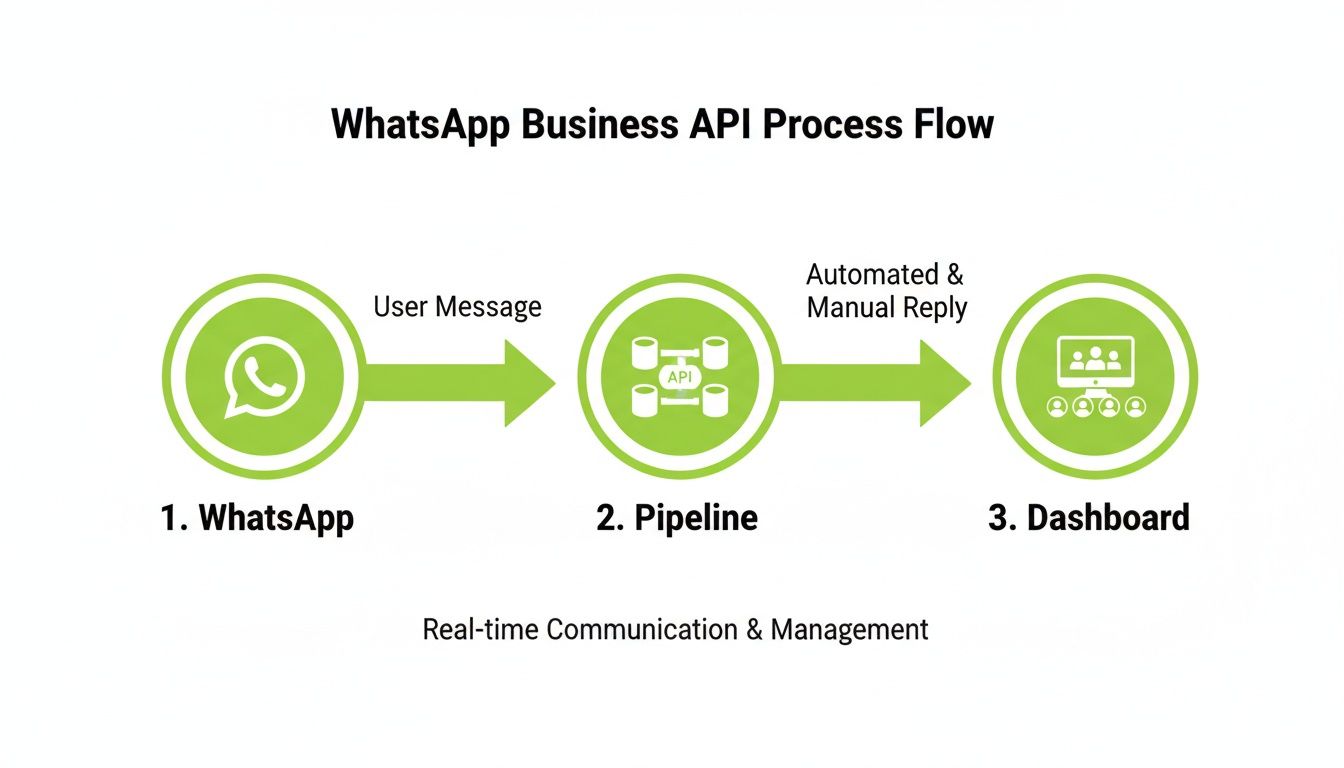
As you can see, once you're connected, every conversation is centralized. It's the end of chaotic, one-on-one replies and the beginning of organized, team-based selling.
Connecting Your Number and Inviting Your Team
First things first, you'll need to pick a platform and link your WhatsApp Business number. It's usually a straightforward, one-time setup that involves a quick verification of your business through Meta. Once that's done, your number is officially free from being tied to a single phone.
Next up, it's time to bring your sales reps on board. Instead of dealing with QR codes to link devices, you'll just send email invitations right from the platform's dashboard. This is where you really start to feel the power of a true multi-user WhatsApp Business setup. Each team member gets their own login, giving you total control over who sees what.
Pro Tip: As you invite your team, think about roles from day one. Not everyone needs the same level of access. A junior sales rep might only need to handle new incoming chats, while a sales manager will need a bird's-eye view of all conversations and performance stats.
Configuring Your Shared Inbox for Sales Success
With your team in place, the next move is to shape the inbox into a high-powered sales machine. This isn't just about answering messages—it's about creating a structured workflow that turns conversations into closed deals.
Start by setting up rules for how incoming chats are managed. A round-robin assignment, for example, is a game-changer. It automatically distributes new leads fairly across the team, making sure every inquiry gets a fast response. This one feature kills the all-too-common problem of hot leads going cold simply because no one knew who was supposed to reply.
Then, lean into the collaboration tools. A proper shared inbox lets your team work together on a single lead without tripping over each other. For example, a rep can drop an internal note on a chat—completely invisible to the customer—that says, "This lead is qualified but needs a custom quote. @SeniorCloser, can you take over?" This creates a perfectly smooth handoff, all within the same conversation thread.
For a deeper look at building a high-performing team structure, check out our guide on how to manage a sales team effectively.
Activating Templates and Multilingual Support
Finally, you need to arm your team with tools that make them faster and more consistent. Build out a library of pre-approved message templates or quick replies for all those frequently asked questions. This doesn't just save a massive amount of time; it also keeps your brand's voice consistent, no matter which agent is typing.
If your business operates across different regions, multilingual support is non-negotiable. Many modern platforms offer on-the-fly translation, allowing your team to instantly understand and reply to customers in their native language. It's a simple feature that tears down communication barriers, making your business feel far more accessible and trustworthy. Getting these foundational steps right turns your WhatsApp channel from a basic messaging app into an organized, revenue-driving engine.
Proven Workflows for Managing a Shared WhatsApp Inbox
Getting a team inbox is a great first step, but the real magic happens when you build smart, repeatable workflows around it. A shared inbox for WhatsApp Business multiple users can be so much more than a chat tool—it can become your team's central revenue engine. It's all about adding structure to your sales conversations.
A perfect place to start is with a round-robin lead assignment. This simple but powerful rule automatically hands new incoming chats to the next available sales rep. It completely removes the guesswork of who should respond and guarantees every lead gets a reply in minutes, not hours. That speed alone can make a huge difference in your conversion rates.
Creating a Library of Quick Replies
Another workflow that pays off immediately is building a library of message templates, often called quick replies. Think about the questions your team answers over and over again—pricing, feature details, shipping info. Creating pre-approved, one-click answers for these common queries does two crucial things.
First, it's a massive time-saver, freeing up reps to focus on more complex, high-value conversations. Second, it keeps your brand's voice and information perfectly consistent, no matter which agent is on the other end of the chat.
Leveraging AI for Instant Context
In a fast-moving sales environment, getting up to speed on a conversation instantly is a non-negotiable. This is where AI-powered features really shine. Many modern platforms can generate one-click summaries of an entire chat history.
A sales manager jumping in to help close a deal, or a rep taking over for a colleague, can get the full picture in seconds. An instant summary provides all the critical context without forcing them to scroll through endless messages, ensuring a seamless and informed interaction.
This simple workflow stops your reps from asking customers to repeat themselves—a tiny point of friction that can easily kill a deal's momentum.
Visualizing the Customer Journey with a Sales Pipeline
Finally, the most impactful workflow is tracking every single conversation in a visual sales pipeline. Instead of letting chats pile up and get lost in a cluttered inbox, you can move them through clear stages like "New Lead," "Qualified," "Proposal Sent," and "Closed-Won."
This gives you a real-time, at-a-glance overview of your entire sales process.
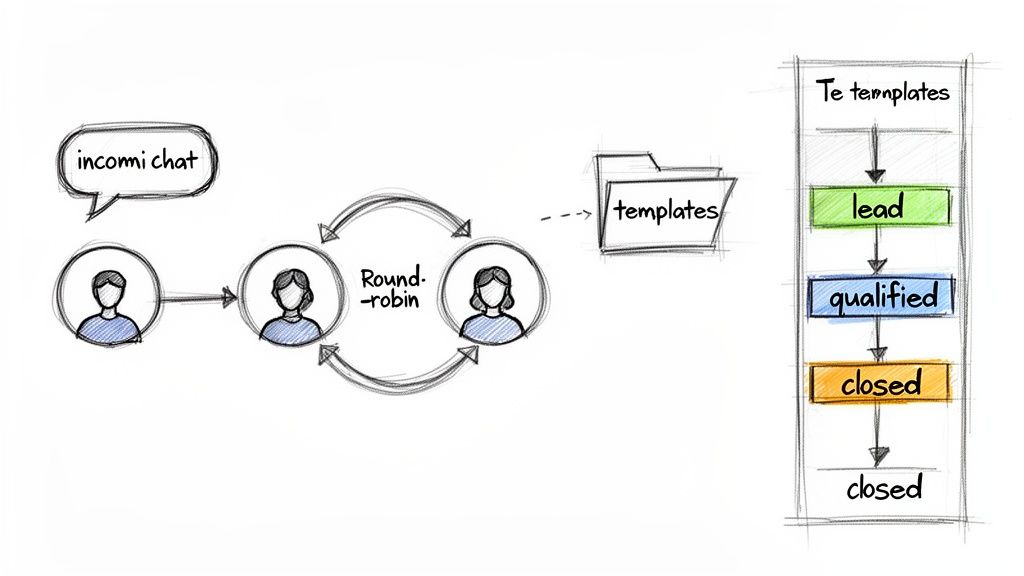
For sales managers, this visibility is invaluable. You can instantly see which deals are moving forward and which ones might be stuck. By implementing this, you turn every WhatsApp chat from a simple message into a measurable step in your customer's journey.
To dive deeper into turning these interactions into revenue, check out our guide on how to manage sales leads effectively.
Sales Team Workflow Before and After a Unified Inbox
The difference between a disjointed process and a structured one is night and day. A unified inbox with smart workflows doesn't just organize chats; it fundamentally changes how your sales team operates for the better.
Here's a quick look at how daily tasks transform:
| Sales Task | Before (Scattered Personal Accounts) | After (With Closi's Team Inbox) |
|---|---|---|
| Lead Response | "Who saw this first?" Leads wait for hours. | Automatic round-robin assignment. Replies in minutes. |
| Answering FAQs | Typing the same answers repeatedly. Inconsistent info. | One-click quick replies. Consistent, on-brand answers. |
| Agent Handoffs | Reps read long chat histories. Asks customers to repeat info. | Instant AI summaries. Smooth, context-aware handoffs. |
| Tracking Deals | Spreadsheets and guesswork. No real-time visibility. | Visual sales pipeline. See every deal's status instantly. |
| Manager Oversight | Blind to team activity until manual reports are pulled. | Real-time dashboard. Can assist reps on live deals. |
As you can see, the "after" column isn't just about being more organized—it's about being more strategic, responsive, and ultimately, more effective at closing deals. These workflows give your team the structure they need to succeed.
Common Mistakes to Avoid
Switching to a multi-user WhatsApp setup can be a massive win for your sales team, but I've seen a few common missteps trip people up. Knowing these pitfalls ahead of time helps you sidestep the headaches and make the transition a success from day one.
The biggest hurdle is often a simple one: not playing by Meta's rules. It's easy to get excited about proactive outreach, but blasting unsolicited marketing messages is the fastest way to get your number flagged or even blocked. It's a gamble that just isn't worth it.
The Golden Rule: Customer-initiated conversations are everything. The entire platform is built to reward businesses that respond quickly and helpfully when a customer reaches out first. Let them start the conversation, and you'll always stay in Meta's good graces.
This isn't just about staying safe, either. A lead who messages you is already warm and interested, making them far more likely to convert than a cold outreach.
Mismanaging High Message Volumes
Another classic issue I see is teams getting swamped by their own success. You run a great campaign, the leads pour in, and suddenly your sales reps are drowning in chats. Without a solid system, response times lag, leads fall through the cracks, and the customer experience tanks.
This is where automation and smart routing become your secret weapons. Don't leave it to your team to manually figure out who answers what. You need a system to manage the flow before it becomes a flood.
Automated Routing: Set up round-robin rules to distribute new chats evenly and automatically among your available agents. No one gets overloaded, and every lead gets a fast reply.
Chatbots for Triage: A simple bot can handle the initial qualifying questions, filtering out basic inquiries. This frees up your human agents to focus their energy on high-intent leads who are ready to talk business.
Managing the volume proactively keeps your team sane and ensures every single lead gets the attention they deserve, even when things get hectic.
Overlooking Brand Consistency
Finally, don't let an inconsistent brand voice sneak into your chats. When you have multiple sales reps firing off replies from a single number, the tone and messaging can easily get disjointed.
One agent might be super formal, while another loves emojis. This kind of inconsistency can confuse customers and make your brand feel unprofessional or disorganized.
The fix is straightforward: build out a shared library of quick replies and message templates. This guarantees that answers to common questions are always on-brand, accurate, and professional, no matter who hits "send." It's a simple move that saves a ton of time and builds a trustworthy brand image with every single chat.
Common Questions About Multi-User WhatsApp
Switching your team over to a shared WhatsApp inbox is a big move, and it naturally brings up a few questions. Before you jump in, you need clear, straight answers. Let's walk through the most common things businesses ask when they start exploring how to get multiple users on WhatsApp Business.
One of the first worries is always the phone number. "Can we keep our existing business number that everyone already knows?" The answer is a simple, resounding yes. You absolutely can migrate your current number from the standard app over to the WhatsApp Business API. Your platform provider handles the heavy lifting, making sure you don't lose that brand identity or leave your customers guessing.
So, What's the Real Cost?
Another big question mark is usually the price tag. How much does the WhatsApp API actually set you back? It's not a single flat fee; the model is split into two parts:
Platform Fees: This is what you pay your provider for their shared inbox software. Think of it as the subscription for the tool itself, including all its features and support.
Meta's Conversation Fees: Meta does charge per conversation, but it's not as intimidating as it sounds. A "conversation" is just a 24-hour window of messaging with a customer.
Here's the best part: Meta gives every single business 1,000 free conversations per month. For a lot of small and medium-sized teams, this covers a huge chunk of their customer chats, making the whole setup surprisingly affordable.
This pay-as-you-go structure means your costs scale directly with your business activity. You only pay for what you use beyond that free monthly allowance.
How Long Does It Take to Get Started?
Finally, people always want to know about the setup time. In the early days, getting onboarded with the API could be a real headache—a long, technical process that felt like a chore. Thankfully, those days are long gone.
Modern platforms have streamlined the entire process. Getting everything set up—from connecting your number through Meta to inviting your team and setting up your inbox—can now be done in just a few minutes. You don't need to be a developer or have any special tech skills. Your team can go from juggling chaotic personal chats to working from a single, organized sales inbox in less time than it takes to grab a coffee. This quick start means you can begin seeing the payoff from a proper multi-user WhatsApp Business system almost right away.
Ready to stop losing leads in scattered chats? Closi centralizes your WhatsApp conversations into a powerful, collaborative sales inbox. Get started for free and see how a unified view of your pipeline can transform your team's performance. Start closing more deals with Closi today.
Frequently Asked Questions
Have a question not in here? Contact us
- How much does the WhatsApp Business API cost?
The WhatsApp Business API uses a two-part pricing model: platform fees (paid to your provider like Closi for the software) and Meta's conversation fees. The good news is Meta gives every business 1,000 free conversations per month, which covers a significant portion of most small to medium-sized teams' activity. Beyond that, you only pay for what you use.
- Can I keep my existing WhatsApp Business number?
Yes! You can absolutely migrate your current WhatsApp Business number to the API. Your platform provider handles the technical migration process, ensuring you don't lose your brand identity or leave customers confused. The process typically takes just a few minutes to complete.
- How many team members can use WhatsApp Business multiple users?
With the WhatsApp Business API, there's no limit to how many team members can collaborate on your shared inbox. Unlike the free app which only supports up to 4 linked devices, the API scales with your business needs - whether you have 5 reps or 50.
- What's the difference between linking devices and using the API?
Linking devices through the free app gives you basic multi-device access but lacks professional features like automated routing, performance analytics, or internal notes. The API provides a true shared inbox with advanced collaboration tools, automation, and scalability designed for sales teams.